Projects, tracks & setlists
How CueStack organizes your shows.
On this page
Projects
A project holds a set of tracks and all of their cues. Use one per show, one per venue, or one per client. The free version includes one project; the full version unlocks multiple projects.
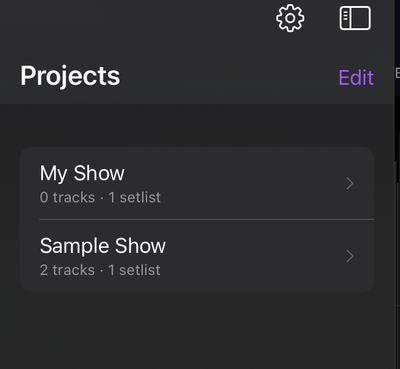
- Tap + to create a project, or import one.
- Tap a project to open it. CueStack reopens your last project on launch.
- Long-press a project to rename, export, or delete it.
- You can delete projects down to none, which returns you to the empty "No projects yet" state.
Tracks
A track is an audio file with cues attached to it. You import audio to create a track, then mark cues in the editor. The free version includes up to three tracks per project; the full version unlocks unlimited tracks.
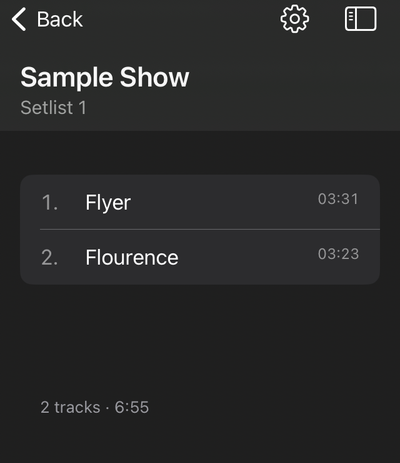
- Tap a track to open it in the editor.
- Long-press a track to rename, duplicate, or delete it.
- Tap the import button to add audio. See Importing your music.
Setlists
A setlist is an ordered subset of a project's tracks, the running order for a show. Only tracks in the active setlist play when you advance through a show; tracks not on the setlist appear in a separate section and do not play in sequence.
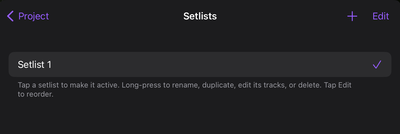
- Tap a setlist to make it active.
- Long-press to rename, duplicate, edit its tracks, or delete it.
- Tap Edit to reorder.
You manage setlists in Project Settings.
Setlists are a full-version feature. The free tier has no setlists; any attempt to use them opens the upgrade screen. With the full version, you get unlimited setlists per project.
Exporting a project
You can save or share a project as a .cuestack bundle. The bundle contains the
audio and all cues, so it is a complete backup you can move to another device.
Open Project Settings and tap "Export Project" to share the bundle. To bring a
bundle back in, open the Projects list, tap the add button, and choose Import
Project, then pick the .cuestack file. Export and import of bundles is a
full-version feature.